TABLE OF CONTENTS
- Preamble
- Type of sync
- Which data is sent to the other system?
- Other important information
- Steps to Synchronise data
- Troubleshooting
Preamble
While Tes takes all care to ensure any mention of the other system is correct and up to date, it is the user's responsibility to check with the other system prior to an initial sync. If the user becomes aware of any changes to the other system, we would very much appreciate this feedback.
Type of sync
- Duties
- StudentClasses
- Timetable
- TUnAvail (Meetings, teacher unavailability, and room unavailability)
Which data is sent to the other system?
Note that Tes builds many excellent features to help users build high-quality timetables, and while these features can be sent onto the other system through the synchronisation process, not all systems have built the capability on their end to receive/display these features.
| Tes Timetable feature | Notes on feature | Has this feature received by the other system? | Other notes |
| Bell times | Bell times as per the Grid structures | No | |
| Campuses | Campuses and their associated rooms | Yes | |
| Classes | Classes as per Class data screens | Yes | |
| Class lists | Yes | ||
| Composite classes (linked classes) | One teacher teaching more than one class at the same time | Yes | |
| Duty roster | Yes | ||
| Faculty data | No | ||
| Grid structure codes | Yes | ||
| Multi-file | Two (or more) timetable files | No | |
| Multi-grid | Multiple grids with different bell times | No | |
| On-call roster | No | ||
| Priority classes | The priority class that shows on students' timetables where they have class clashes | No | |
| Room data | Room Code | Yes | |
| Rotation classes | Classes from particular rotations | No | |
| RTO roster | No | ||
| Student data | Student Code | Yes | |
| Study roster | Study classes, staffing and rooming roster | No | |
| Sub-classes | No | ||
| Teacher data | Teacher Code | No | |
| Teacher days off (Unavailables) | Yes | ||
| Timetable data | Yes | ||
| Two (or more) rooms at once | No | ||
| Two (or more) teachers at once | No | ||
| Year levels (non-numeric) | Year levels such as SPT, LSUP, ROLL, Yr9+10, etc. | No |
Other important information
Steps to Synchronise data
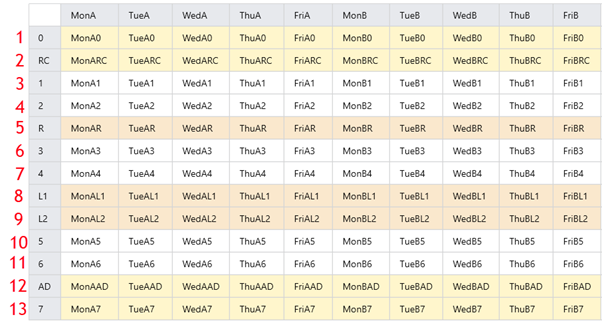
Step 1: Check if any Simon Schools set-up is required
Step 2: Configure the Timetable file
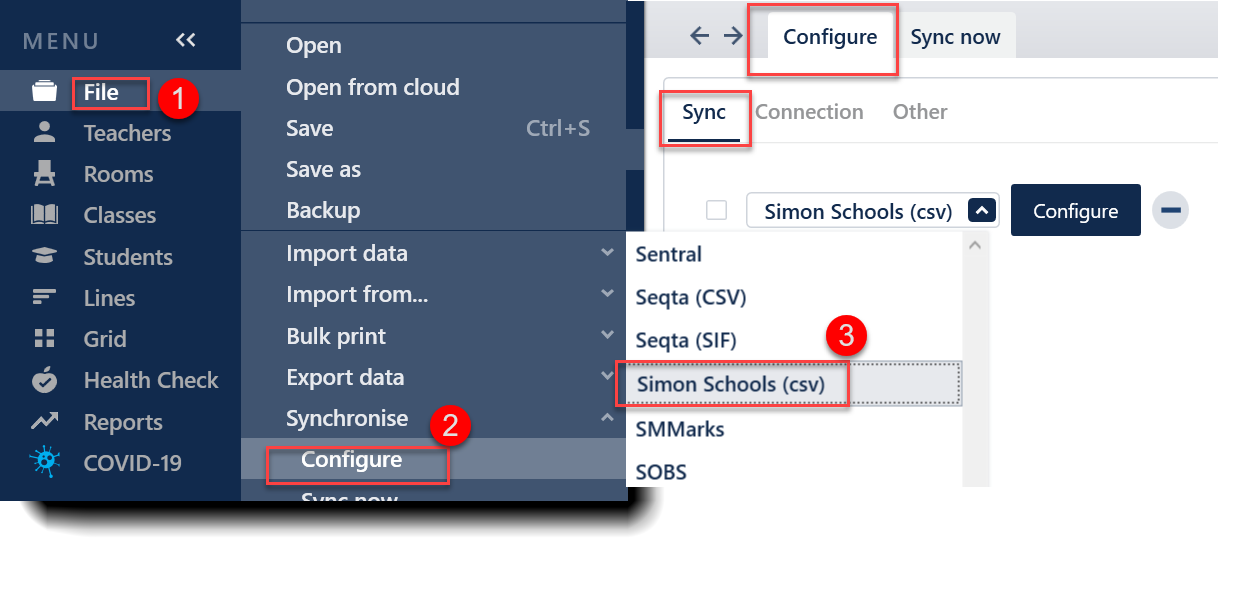
- In the Timetable file, select File > Synchronise > Configure
- In the Configure tab, select 'Simon Schools(csv)' from the drop-down list of options.
- Select the Configure button, which will open the Connection tab. A destination folder must be selected to direct where the .csv files will be saved. Select 'Browse' and locate or create the desired location.
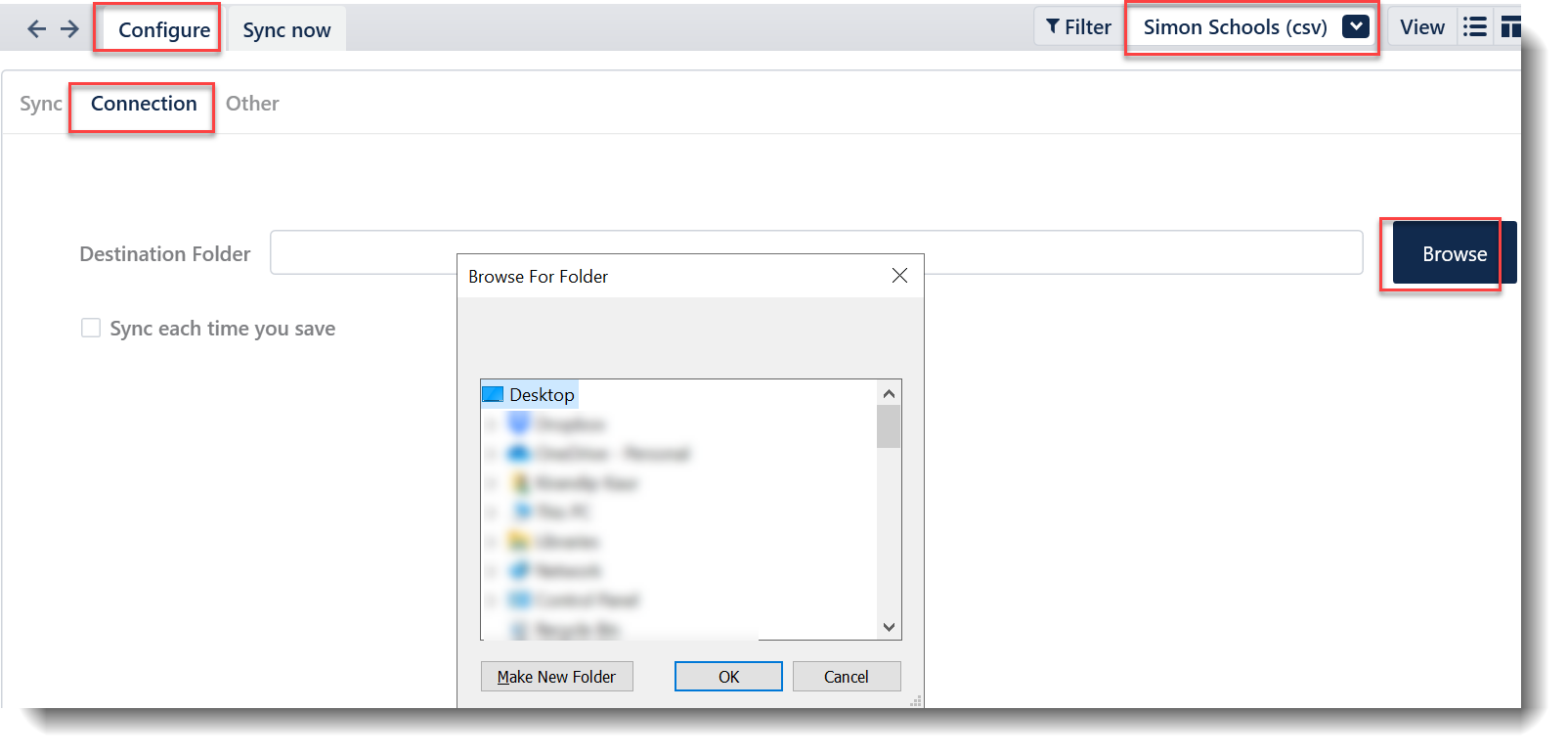
Sync each time you save - This means the sync will occur automatically on a Ctrl-S save. In this case, data is first saved locally to disk, and then an attempt is made to sync with all external systems. This is simple, but you may want to disable this if the external systems or your network is slow to sync, or you want more control over when you publish data through to other systems. No message is shown on a sync-on-save, as it is done quietly. Only an active sync via menu/ctrl-K will show a completion message.
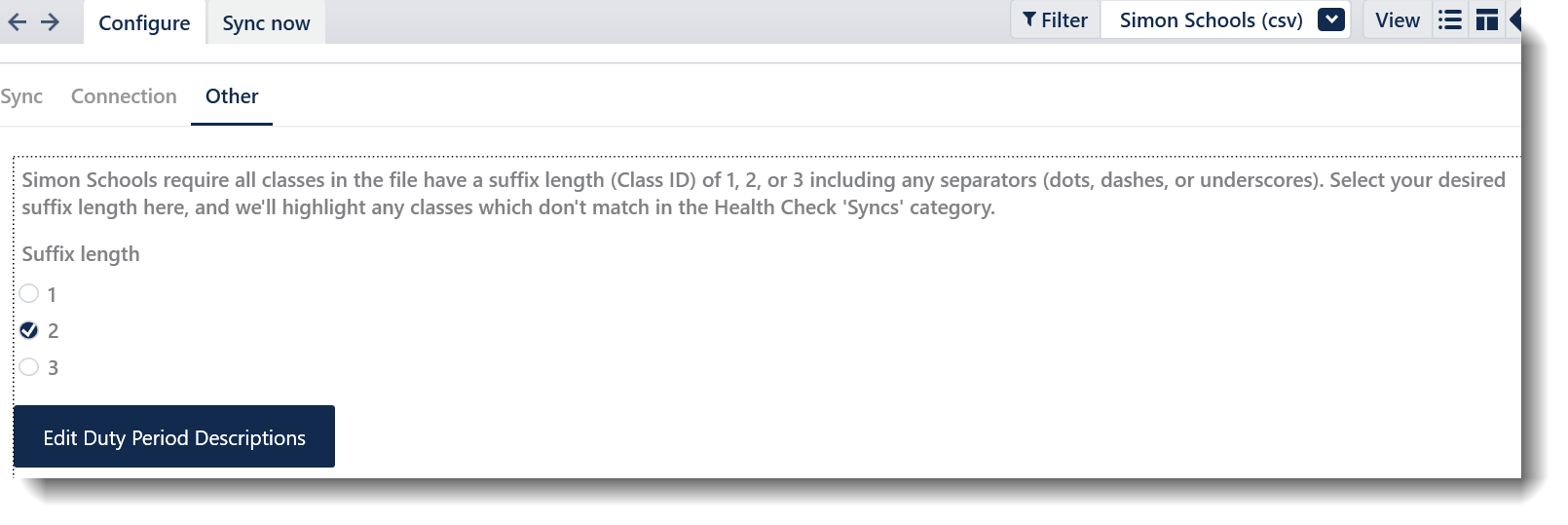
Simon expects all classes in your file to have the same suffix length.Please keep in mind that Simon also counts your class ID separator as an extra character. For example, if your class codes contain a separator, such as 11DRA.01 or 11DRA_01 or 11DRA-01, then you have a three-character suffix - the separator (“.” “_” or “-”) and the class identifier, “01”.Option | Details | |||||||||||||||||||||
Suffix length | Which suffix length should I choose? The table below gives some examples of class codes and their suffix lengths. You need to choose the suffix length that matches the majority of your class codes. Any class codes that don’t match the selected suffix length will be modified to match when they are exported. Important: Separators (dots, dashes, underscores) are included in the suffix length:
| |||||||||||||||||||||
Edit Duty Period Description | The timetable file now exports duties to Simon Schools. These are exported to a file called “Duties.txt” in the same folder as the other Simon files. You may want to provide your periods with the equivalent duty period names in Simon. You can do this by navigating to File > Synchronise > Configure, selecting 'Simon Schools (csv)' from the top-right dropdown, and clicking 'Edit Duty Period Descriptions' in the 'Other' tab. 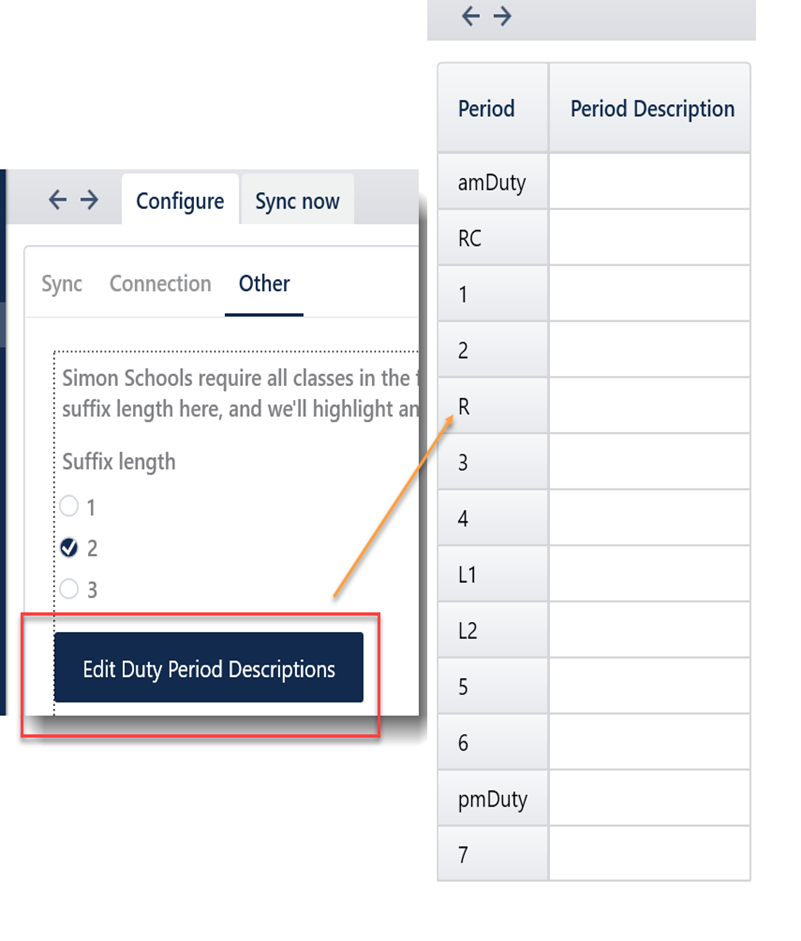 |
Step 3: Perform the sync export
- Navigate to File > Synchronise > Sync now.
- Select/ensure that the Simon Schools(csv) option is chosen in the Filter menu on the top right.
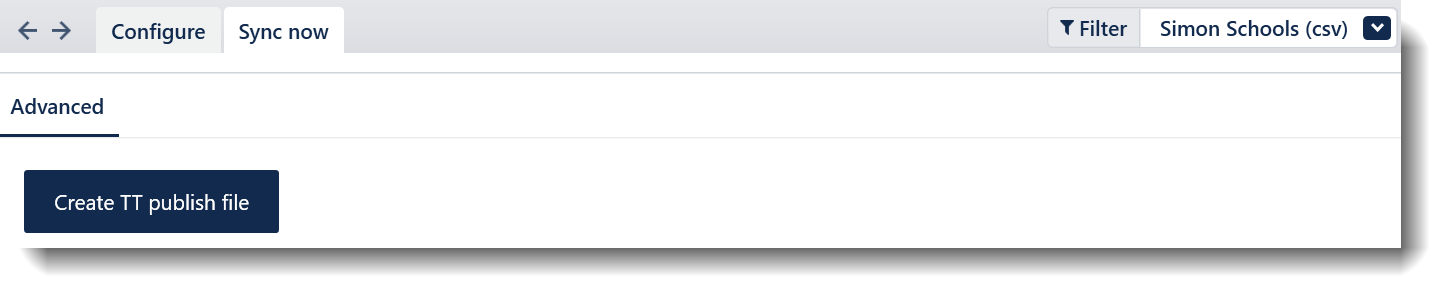
- Select 'Create TT publish file'

| File Name | Data Column (A) | Data Column (B) | Data Column (C) | Data Column (D) | Data Column (E) | Data Column (F) |
| Duties.txt | Day Number | Duty period description (Entered in sync config) | Duty area | Teacher code | Campus code | N/A |
StudentClasses.txt | Student code | Class code | N/A | N/A | N/A | N/A |
Timetable.txt | Day number | Period number | Class code (special requirements on suffix length, may not be the exact class code from the Timetable file) | Room code | Teacher code | Campus code |
TUnAvail.txt (Contains meetings, teacher unavailabilities, and room unavailabilities) | Meeting name (for meetings), or N (teacher not on property (unavailable)), or R (room unavailable) | Teacher code, or room code (for room unavailability) | Day number | Period number (edited) | N/A | N/A |
Step 4: Upload/Import the CSV files into Simon Schools
For information on how to import this to Simon Schools, please contact the Simon Schools support team.
Troubleshooting
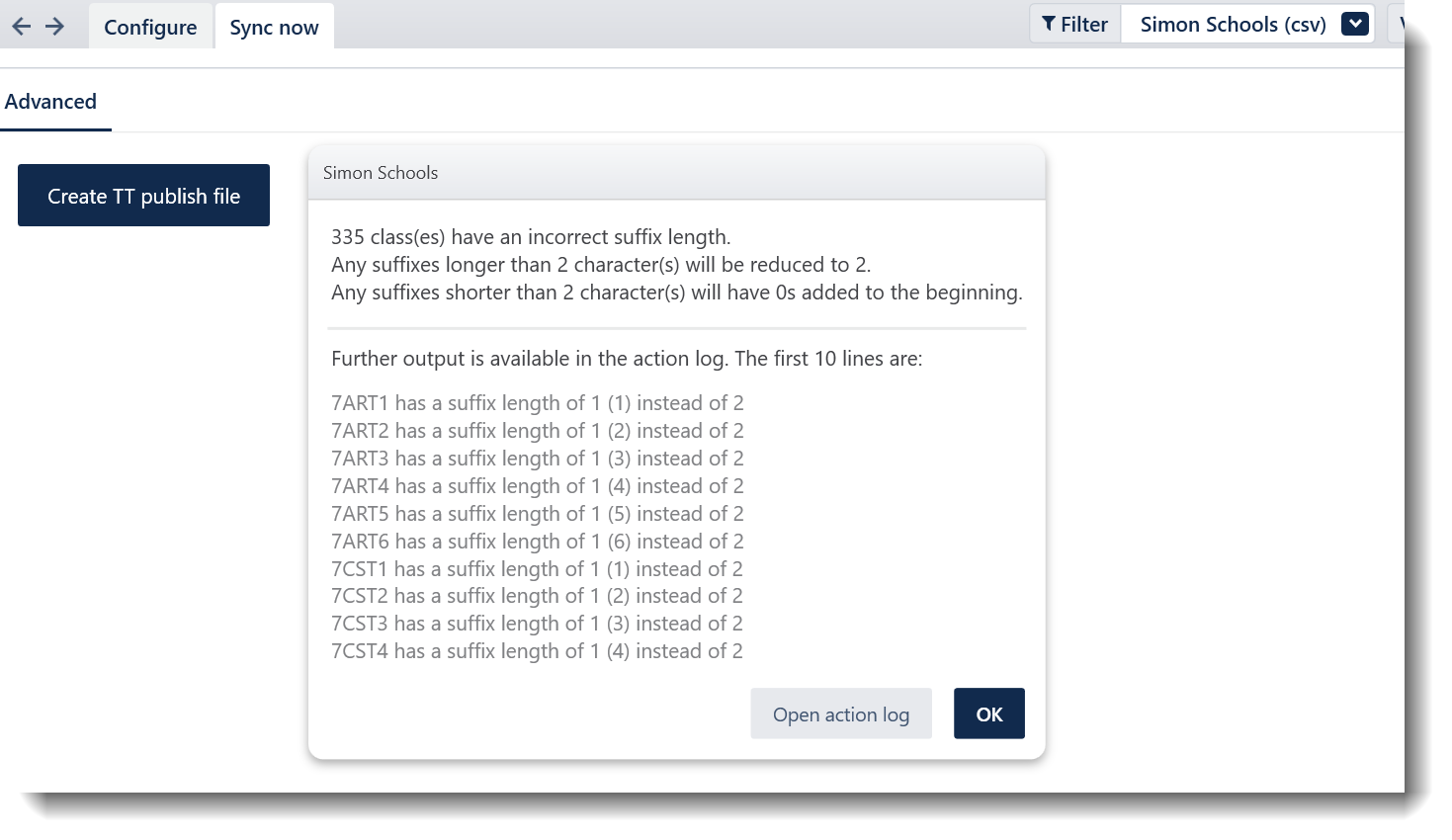
The above screenshot indicates that the class suffix length is 1, while 2 was selected in the 'Other' tab.
The sync report under Health Check will also indicate if there are any class codes that do not match the Simon requirement and what you have selected in the Other tab. This will help you identify the issue without going to the Synchronise screen and discovering the error when exporting.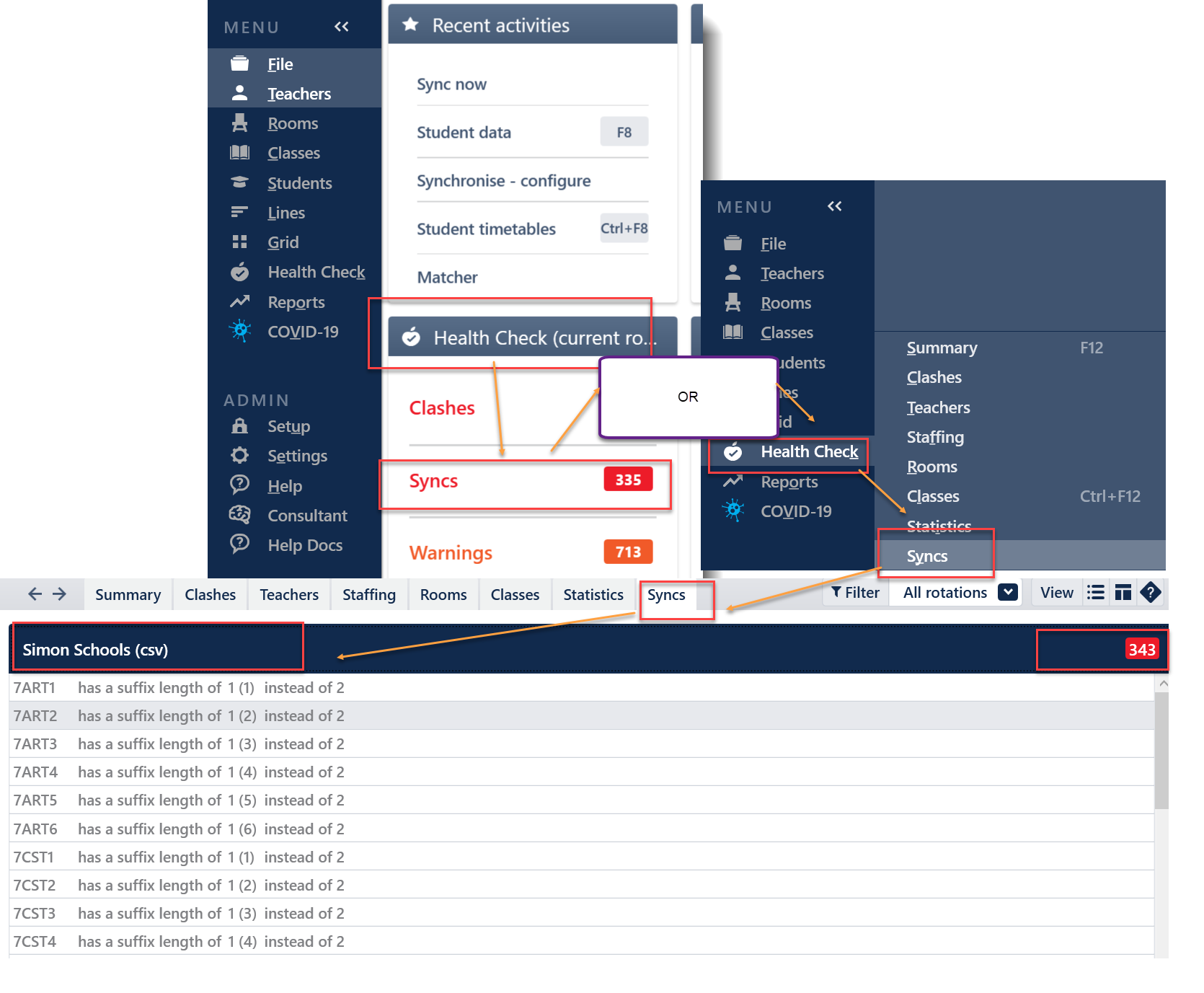
The screenshot above indicates that there are about 335 classes that don't have the correct suffixes. For example, 7ART1 has 1 suffix while in the 'Other' Tab, 2 suffix length is selected.
Was this article helpful?
That’s Great!
Thank you for your feedback
Sorry! We couldn't be helpful
Thank you for your feedback
Feedback sent
We appreciate your effort and will try to fix the article