TABLE OF CONTENTS
Preamble
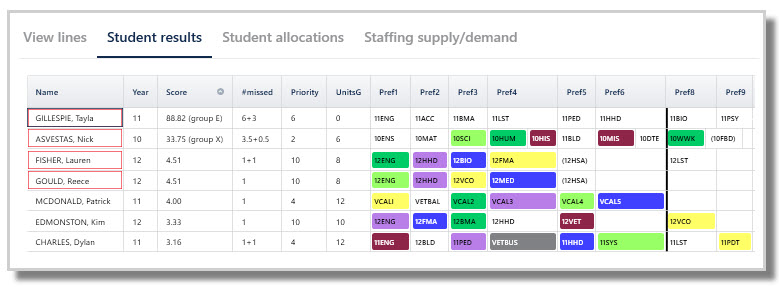
Each set of lines generated should be reviewed for acceptability. It is important to analyse the Student results screen via Lines > Line results > Student results, which displays the detailed student scores, courses granted and any missed courses.
The overall scores and statistics display at the bottom of this screen. Refer to E10 - View lines: Results of line generation.
View Options
Click on the View menu to toggle between options depending on how the results are being analysed.
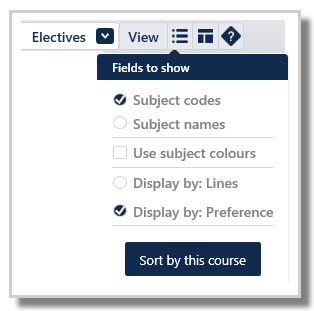
- Subject codes: Displays courses by codes
- Subject names: Displays courses by name
- Use subject colours: By default, courses display to match the line colour they are in. Enable this option to display by subject colours instead.
- Display by: Lines: Headings are displayed in Line order. Useful to see which lines students do not have a subject in.
- Display by: Preference: Headings are displayed in Student preference order. Useful to highlight the preference level of any missed courses.

- Sort by this course: Click a course, then click 'Sort by this course'. This will display students by preference level for the selected course, ie students who chose it at the highest preference first, then the next level preference and so on.
Student Results Fields
Name
Student's name as per Student data.
Year
Student's year level. Useful when using a multi-year dataset.
Score
Penalty score based on missed preferences, priority and program completeness.
- 0 means all main preferences are granted (perfect result)
- Higher scores indicate poor outcomes
#missed
Number of courses a student missed. Decimal values may occur with rotated datasets.
- 1+1 means one main and one reserve preference missed
- 0.5+0.5 means one rotation main preference and one rotation reserve course missed
Priority
Student's priority level in Lines > Elective data > Students > Pri field. The algorithm attempts to satisfy students' preferences who have a higher priority over those with a lower priority.
UnitsG
Total units granted to student.
NOTE
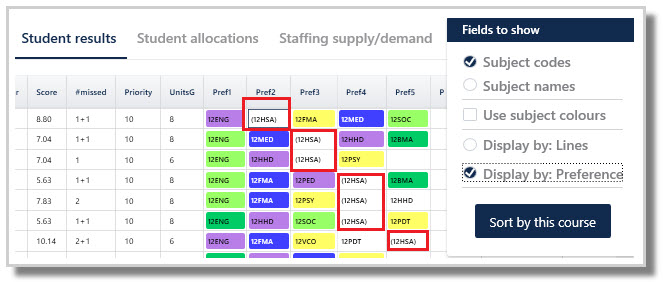
Courses shown in brackets are not running (Elective data > Courses > #C = 0). Cancelled courses still appear in the Students results screen, but in brackets as a reminder why the student could be granted that subject.
Line/Pref
- Displays granted courses in faculty colour, if displayed by Line
- Displays requested courses, matching the line colour, if displayed by Pref
NOTE
Offline and Missed columns will only appear if the 'Display by: Lines' view is selected. See View Options above.
Offline
Shows any courses marked 'Offline' in the Elective data > Courses > Lines field, as the course is not on any line.
Missed
Displays any courses not granted.
WARNING
Red-highlighted students do not have a full program. These students need counselling to select an alternative subject.
NOTE
The units total of a student's main preferences make up a full program. If not all main preferences can be granted, the system attempts to give a reserve. If this is not possible, the student is flagged as having an incomplete program.
Examples
CHAMBERS, Stan requested six courses (12 units) but was granted only four (8 units). He is highlighted in red as he does not have a full program. His penalty score of 10 reflects two missed main preferences (Pref 1 and Pref 6), his Priority level 4, and he did not receive a full program. No reserves have been collected to replace the missed courses.
DIXON, Kandy requested five courses (10 units) but was granted only four (8 units), hence the red highlight. Her penalty score of 7 is due to missing Pref4 (course not running in brackets), and a Priority level of 6 (higher that Stan's). No reserve subject collected to replace the missed course.
DIXON, Kandy requested five courses (10 units) but was granted only four (8 units), hence the red highlight. Her penalty score of 7 is due to missing Pref4 (course not running in brackets), and a Priority level of 6 (higher that Stan's). No reserve subject collected to replace the missed course.

BURNER, Kim got a full program (12 units) and is not highlighted. She requested six main preferences (12 units) and has been granted 12 units. She missed one main preferences (Pref3) but got her first reserve, resulting in a low penalty score of 2.36.

JENS, Charlene has been given a complete program but missed out on main Pref5. She also missed out on her first reserve (11MED is not running) and Pref9, but was placed into Pref10.

TIP
Reserve preferences should be collected to improve the likelihood of getting a full program if a main preference is missed.
Further analysis
Double click a student's name to open the Student allocations screen. This allows you to analyse why the student did not receive the courses they requested. Refer to E10 - Line results: Student allocations
Also refer to Lines > Analysis for further analysis tools.
Was this article helpful?
That’s Great!
Thank you for your feedback
Sorry! We couldn't be helpful
Thank you for your feedback
Feedback sent
We appreciate your effort and will try to fix the article