This article clarifies which Timetable data types are specific to a date range in Daily (Edval web server), and which are not. This is important to understand when you should sync, over what range and how to best manage timetable rotations.
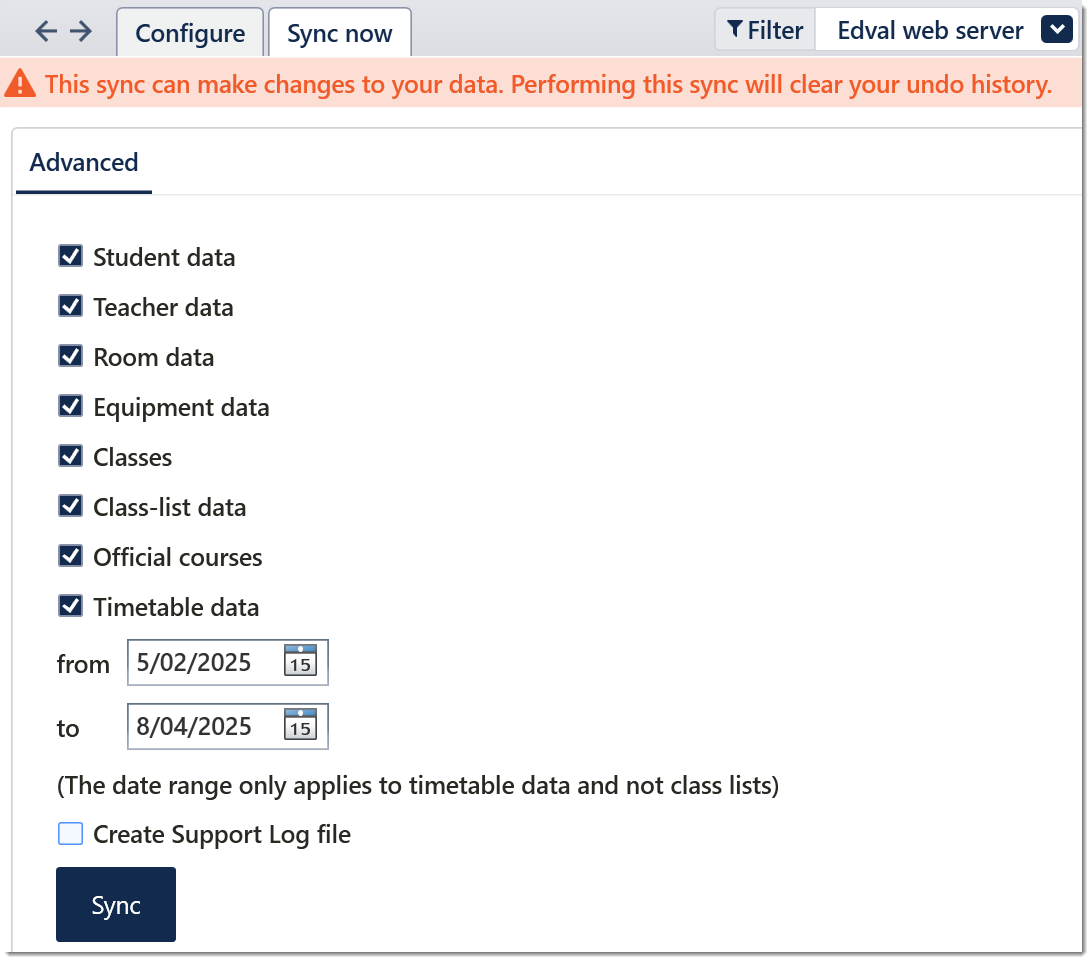
Data other than Timetable such as Student, Classes, Class-list, etc. are not tied to a date range. This means that regardless of the from and to date you sync for, these data types affect the whole academic year in Daily. For example, You cannot have a class-list be different for any particular date without changing that class-list for the whole academic year.
These concepts are important to consider when managing rotation changes. You may want to sync the next rotation ahead of time, however syncing more than Timetable data would interfere with the current rotation. Instead you would sync only the timetable data for the future dates and Daily will let you manage the next rotation that way. This approach may not be right for your situation however so please consult this document for more information:
Uploading 'Next Rotation' in Tes Timetable file from E10 to Timetable Daily
Uploading 'Next Rotation' in Tes Timetable file from E10 to Timetable Daily
Timetable data sent to Daily is your cyclical Timetable data. 'Cyclical' here refers to the pattern of lessons in your timetable, without being explicitly tied to dates. This is why date mapping is required in Daily to map the cycle to the calendar and designate rotation dates.
Was this article helpful?
That’s Great!
Thank you for your feedback
Sorry! We couldn't be helpful
Thank you for your feedback
Feedback sent
We appreciate your effort and will try to fix the article