TABLE OF CONTENTS
Preamble
Schools may wish to restrict certain students from selecting specific courses when using Timetable Choice. This could be due to a number of reasons, such as not completing a prerequisite course, or that it is contrary to the teacher's academic recommendation.
There are two methods to manage these restrictions:
- Forbidden courses
- Prerequisite requirements
This document explains the first option: Forbidden courses.
For the second option, refer to: E10 - Choice: Setting Course Prerequisites.
Forbidden courses webinar
The following video gives an overview of Forbidden courses.
How to enter Forbidden courses
There are two ways to enter Forbidden courses:
- via a csv file import
- manually editing by student
Import Forbidden courses from a csv file
This method is useful where there are many students to be restricted.
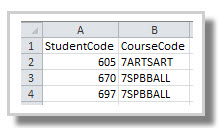
- Set up a single csv file with 2 columns with column headings: 'StudentCode' and 'CourseCode'.
Only one file can be imported per dataset, so where a multi-year dataset exists, include all year levels in one csv file.
- Navigate to Lines > Elective data > Students > Action: Import forbidden courses.
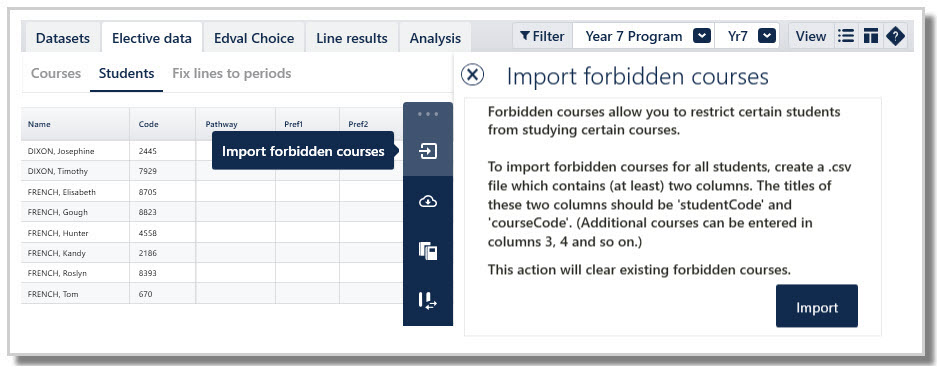
- Select Import.
- Browse to the location of your csv file and select the file.
- The data will be imported.
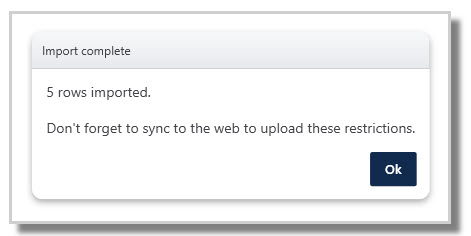
- Sync the file to upload the forbidden course information to Timetable Choice.
WARNINGWhen an import is performed, all existing forbidden courses in the etz file will be overwritten.
Manually edit Forbidden courses
This is useful if there are just a few students to be restricted.
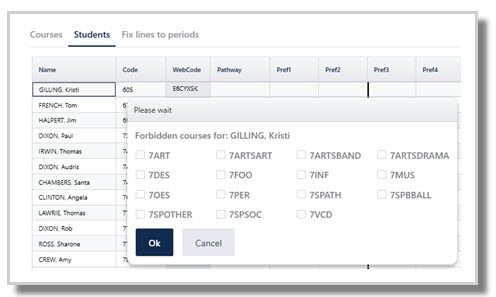
- Navigate to Lines > Elective data > Students.
- Click on the relevant student's name.
- Right click on the student's name.
- Select 'Edit forbidden courses'.
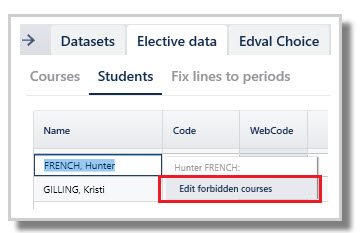
- Tick any courses the student is forbidden from selecting, then click OK.
- Sync the file to upload the forbidden course information to Timetable Choice.
NOTE
Refer to Choice: Ineligible Courses on webforms for information about how Forbidden courses are handled for students in Timetable Choice.
Was this article helpful?
That’s Great!
Thank you for your feedback
Sorry! We couldn't be helpful
Thank you for your feedback
Feedback sent
We appreciate your effort and will try to fix the article