TABLE OF CONTENTS
Preamble
Constructing elective lines is a complex and critical part of timetabling. This key process directly affects staffing cost, room usage, timetable flexibility, and educational outcomes, while meeting student subject preferences.
While generating a solution is often straightforward, achieving a good solution requires careful consideration. Student preferences should not be the sole measure of success. Staffing viability, room suitability, and appropriate class spreads are equally important. In some cases, denying a small number of preferences may result in a better overall educational outcome.
REQUIRED READING
Read first: E10 - Generating Lines : Overview and tips and all Elective data > Courses documentation.
Data validation checklist
Before generating lines, ensure the following data is correct in the file:
1. Lines > Elective data
- Student preference data
- All data columns in the Courses screen for all year levels in the dataset
- All rules and constraints
- Lines to periods (if using)
2. Teacher and room information, particularly for all courses and staff involved in the line generation:
- Teachers > Subject teachers
- Rooms > Subject rooms
- Teacher unavailability for part-time staff
IMPORTANT
The accuracy of the information determines the quality of the generated lines.
Once all data has been verified, line generation can begin.
Generating Lines
General Steps
- Navigate to Lines > Elective data > Courses > Action: Generate lines.
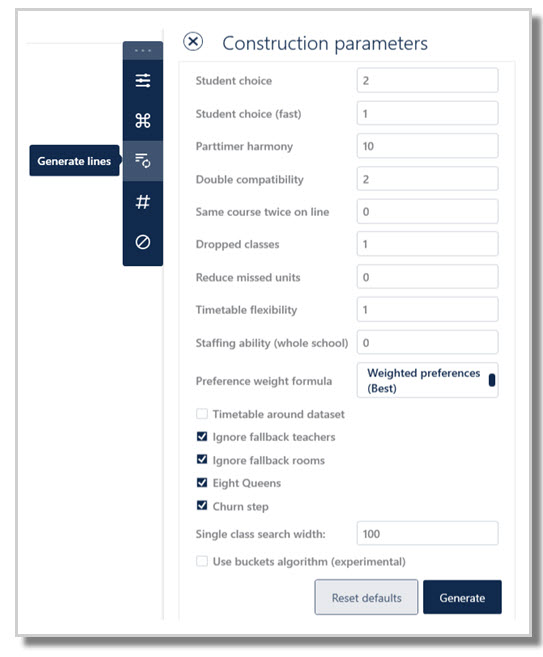
- Set the Construction parameters.
- Click Generate.
NOTE
The line generation process uses multiple construction parameters. The default values work in most cases. Adjusting even a single parameter can significantly affect the outcome. You can experiment different values across file versions, provided their implications are understood.
Variables that affect line generation
- When constructing lines, there are constraints beyond students’ preferences.
- Students’ choices are limited by maximum class sizes.
- Line structures are constrained by the availability of teachers and rooms.
- Specialist resources can impose additional constraints, e.g. if there is only one Art room, then all Art classes must be on different lines.
Construction parameters
- The default values shown in the Construction Parameters represent penalty values.
- These penalty values operate in relation to one another rather than independently.
- Each value is multiplied together to calculate an overall solution score.
- The aim is to achieve the lowest possible overall score, indicating the most optimal solution.
Reset defaults
If any default settings have been changed, they can be easily reinstated by selecting the Reset defaults button.
Generate
- Select Generate once all data and parameters are set.
- The system identifies the best solution based on student choices, school resources, and file parameters.
- If data issues are detected, an error message will be displayed; correct the data and generate again.
- When a solution is found, it is shown in Lines > Line Results > View Lines. Refer to: E10 - View lines: Results of line generation.
- Analyse results. Refer to: E10 - Line results: How to analyse the lines solution.
- Optimise solution. Refer to: E10 - View lines Action: Optimise solution.
- Or, generate again until an acceptable solution is found.
NOTE
The first solution is rarely final. Users iteratively refine inputs (such as Rules, VLinks, HLinks, or Parameters), analyse results and regenerate.
Construction parameters explained
Parameter | Explanation |
Student choice | This is the most important. Arrange classes to minimise having students who miss out on their preferences. This takes longer than a fast ‘guess’ calculation, which is used to get an initial good solution faster. |
Student choice (fast) | This is a fast-to-compute 'estimate' of the above, using a different formula. It is not an important parameter. |
Part- timer harmony | How important is it to align part time staff together on the same lines to ensure efficient scheduling later on? If a teacher is unavailable on a Tuesday, we try to place them in lines with others who need a Tuesday off, or even ‘one day off’. Increasing this weight means we increase the likelihood that this consideration is met over the consideration of more student choices. Balance is important. We do not ‘force’ part-timers to align to lines unless the impact on students is appropriately low. Note that there has not been any specific assignment of part time staff to courses at the elective line generation stage, so it is the possibility of their subsequent assignment which is being considered here for better flexibility in later scheduling. |
Double compatibility | How important is it to align subjects according to their time pattern requirements? Do some subjects want doubles, while others do not? This weight will check the Courses table and look for any entries in the D/S field (Doubles or Singles). If subjects are being aligned that have incompatible time patterns, you can check the entry in the D/S field, then increase this parameter to encourage them to find line combinations that result in better spread associations – but at the least cost to student preferences at all times. Incompatibilities can still occur if a lot of student preferences ‘vote’ for this arrangement, but increasing this parameter will make it more important than the preference votes. |
Same course twice on a line | Do you mind if the same course is placed on the same line (assuming there are enough teacher and room options for this to occur)? For example, if you are running 3 History classes, and you have 4 History teachers and many room options, then it is possible that all 3 classes could be placed on the same line, if it works out best for students this way. This may create problems later on though, as students want to swap their classes around, or new students arrive at the school; there is less 'swapability'. To discourage: Enter a positive penalty value. If the same course occurs twice on a line, we add this penalty. It may better help satisfy students by encouraging diversity in the lines. Theoretically, you don't need this because the algorithm will usually spread courses out anyway in its attempts to satisfy as many students as possible, but it might help, especially if you're expecting many future enrolments. To encourage: Enter a negative penalty value, as an incentive. If the same course occurs twice on a line, the total score will be lower. Benefits include: Allows collapsing classes easily later, if numbers drop, allows streaming, social adjustments, common exams, projects, talks, team teaching, excursions, balancing class sizes, etc. Ensure resources are specified correctly, e.g. 3x French classes on together in a line won't work if you only have one French teacher. |
Dropped classes | This option only applies if you enable the 'Explore drops' option in Elective data > Courses > Action bar: Parameters. Each class which is dropped will cause this weight to be subtracted from the score. (We subtract the weight because a low score is always regarded as a good score). Note that it's very important to set this weighting to an appropriate value such as 3, and certainly not too high. |
Reduce missed units | Lets you set a penalty on students not getting the required number of courses (units) as requested in the Students screen. If a student has not specified enough reserve preferences, and you want to avoid re-counselling students, you can set this to e.g. '1'. This control may ensure less students miss units, at the likely expense of slightly worse satisfaction rate in which subjects are actually granted. This advanced parameter is not often needed, as the focus may be more increasing student satisfaction overall. Ensure all students have the same number of reserve preferences so that the algorithm does not favour students without reserve preferences in order to meet this factor. |
Timetable flexibility | How important is it to ensure flexibility in later scheduling of these lines? If three teachers are already on a Year 12 line together, they form a teaching team. It is therefore efficient to encourage these same three teachers to also align in the Year 11 lines as well – provided it does not degrade student preferences by much. Having wildly different lines in two years may cause bad spreads or offline lessons to occur, so while you may maximise student preferences granted, you may subsequently degrade the education delivery when these classes are later scheduled. Balance is important. Consider all factors at all times. |
Staffing ability (whole school) | Specify zero to run the algorithm fast. Otherwise, this will check a staffing arrangement for all classes in the file, even those not contained in the dataset, to attempt to achieve an overall staffable solution. As the rest of the school data is not usually in it's ready-to-be-timetabled state at this point in time, this is usually best left at zero. |
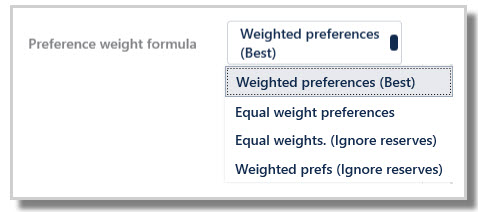
Preference weight formula | Weighted preferences (Best): It is strongly recommended that students preference data is in preference order, as then the system knows which courses to try to grant to students over other courses. Equal weight preferences: This option will be used where the student preference data is in no particular order, and removed the preference weighting component of the algorithm. Equal weights (Ignore reserves): Ignores reserves, not recommended. Weighted preferences (Ignore reserves): Ignores reserves, not recommended. The weighted preferences are weighted as follows:
 |
Timetable around dataset | Tick this box to allow a set of lines to be developed around existing lines as exist in Class data screens. For example, when generating lines for Year 11, they must be compatible with the existing Year 12 lines. By telling Year 11 to work around the Year 12 classes, we will create a set of lines for Years 11 and 12 that can be staffed and roomed to our preferences and there will be no nasty surprises at construction time. If the Yr12 line structure is not yet set in stone, then you should not use this feature - instead you should construct lines in a "Yr11+12" umbrella year level. Refer to: E10 - Elective data > Courses Action: Generate lines around existing lines in other year levels using 'Timetable around' |
Ignore fallback teachers | Tick this box to ignore any fallback teachers that are listed as fallback in either Teachers > Subject teachers or in Courses > Teachers field (which is generally not advisable). If you are prepared to allow fallback teachers to be considered when generating lines, untick this box. Refer to: E10 - Teacher: Subject Teachers |
Ignore fallback rooms | Tick this box to ignore any fallback rooms that are listed as fallback in either Rooms > Subject rooms or Courses > Rooms field (which is generally not advisable). If you are prepared to allow fallback rooms to be considered when generating lines, untick this box. Also ensure you understand the use of the Y column in Rooms > Subject rooms screen as it has a big influence in the lines outcome. Refer to: E10 - Rooms - Subject rooms |
Eight Queens | This option is ticked by default and is an alternative algorithm to the original algorithm. Depending on each school's set up, it may perform better than the standard algorithm. It is suggested that users initially try two versions of line generation, one with this option ticked and another with the option unticked to see which one works better for the file. Any schools using the advanced tertiary features will automatically be using this algorithm. |
Churn step | Churn step is ticked by default, and usually produces better results. Again, occasionally due to the set up of each school it may be better to not use Churn step, so users may like to experiment on their files. |
Single class search width | A "singleton course" is a course with only a single class running (#C = 1). There is a special algorithm for placing "singletons". This algorithm explores many different partial solutions in parallel. This parameter is the number of partial solutions to examine. Higher means it will take more time and possibly get a better solution. |
Further Reading
Related Knowledge Base documents:
Ways to block classes
Generating Lines in NSW
Methods for setting up split elective lines
Was this article helpful?
That’s Great!
Thank you for your feedback
Sorry! We couldn't be helpful
Thank you for your feedback
Feedback sent
We appreciate your effort and will try to fix the article